


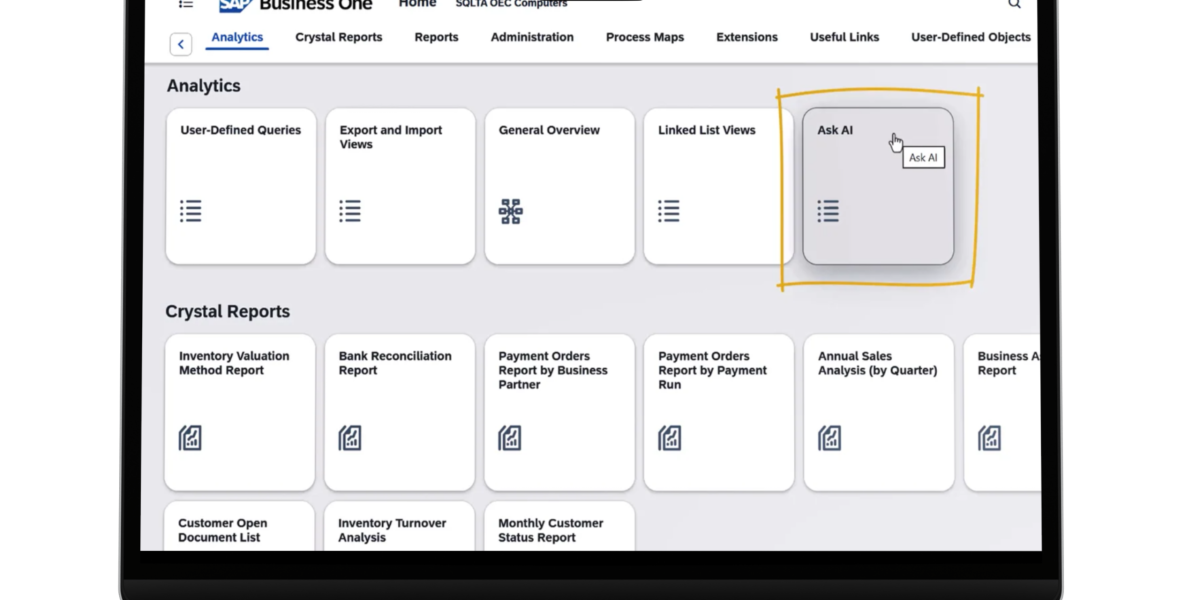
Several years ago, SAP announced major investments in modernizing and expanding the functionality of SAP Business One, its ERP system designed for small and medium-sized businesses (SMBs). This commitment is reflected in Feature Pack 2608, released in August 2026—one of the most substantial updates to date. The main highlights include the expansion of the Web Client, the introduction of the first native generative AI capabilities directly into the application, and new functionalities for financial management, purchasing, inventory, and reporting.
For companies that have already invested in a mature ERP, the continuous development of the platform means access to modern technology and capabilities without the need to replace their existing system. This is also a strong argument for the long-term relevance of SAP Business One.
AI: From Promise to Reality in ERP
Perhaps the most visible new addition in FP 2608 is the introduction of generative AI capabilities into the SAP Business One Web Client. Artificial intelligence is beginning to become part of users’ daily workflows, moving beyond the software bots previously discussed on the System Innovation Romania blog. One of the new features is Ask AI, which allows users to ask natural language questions about information stored in SAP Business One, including context relative to the data they are currently viewing. These queries can also be saved as templates for future reuse.
Another new capability is AI-assisted User-Defined Query creation. Instead of needing to understand the database structure and write SQL manually, users can simply describe the information they want in natural language, and the AI helps generate the query. The benefit is straightforward: ERP data becomes more accessible, even to business users who know the operations inside out but lack SQL skills.For instance, a manager looking to identify clients with overdue invoices above a certain threshold no longer needs to know database tables, fields, and relationships, nor do they strictly need to rely on an IT specialist to build the query. Naturally, AI-generated queries should be verified before being used permanently for reporting. However, the direction is clear: interacting with ERP data is becoming much closer to natural language.
Sales, Purchasing, Inventory, and Logistics: More Automation, Less Repetitive Work
In operations, FP 2608 introduces improvements that help reduce manual workload and ensure more consistent process management. One example is the Procurement Confirmation Wizard, which enables the generation of purchasing documents directly from sales orders. For companies operating on back-to-back supply models or purchasing products specifically to fulfill customer orders, this functionality can eliminate a significant amount of manual data re-entry.
Other notable enhancements cover:
- Sales and Purchasing: Generation and management of procurement documents;
- Inventory and Warehouse Management: Stock management and valuation;
- Material Requirements Planning (MRP): Additional planning features;
- Operational Process Integration: Better alignment between orders, procurement, inventory, and planning.
For a distributor, the benefits will be evident in inventory and procurement management. For a manufacturer, the MRP enhancements may have a higher impact. And for companies handling large volumes of linked orders and purchasing, removing manual steps means fewer errors and greater control. This is a hallmark of a mature ERP: value does not always come from flashy features, but rather from eliminating minor operational bottlenecks that recur hundreds or thousands of times a year.
Financial Management: Increasingly Accessible via Web Client
Expanding the Web Client is one of the core directions of FP 2608. SAP is progressively moving features to the browser that were previously available primarily through the traditional desktop client.
In financial management, updates include:
- Internal Reconciliation
- Payment Run Processing
- Check Management
- Payments and Banking processes
- Additional financial activities available via Web Client
This evolution goes beyond just offering a modern user interface. Users can execute more processes without depending on a desktop installation—a major advantage for companies with distributed teams, mobile employees, or multi-location operations. FP 2608 also brings updates to Project Management (including a dedicated workspace), enhancements to Employee Information and Time Sheets, and a new calendar application. Additionally, Process Maps allow users to navigate visually through ERP workflows instead of relying exclusively on traditional menus. This feature can be particularly useful for casual users, helping them easily identify the steps and tasks they need to complete.
Easier Data Analysis and a More Extensible ERP
FP 2608 expands the reporting capabilities available in the Web Client with new reports such as:
- G/L Account Report
- Purchasing Analysis Report
- Inventory Movement Report
A major benefit is the ability to drill down directly to source documents. Users can navigate from high-level summary figures in a report down to the specific underlying transactions, giving them clearer context behind the data. The Banking and External Reconciliation area also introduces manual, semi-automated, and fully automated reconciliation options. For businesses with high transaction volumes, these can significantly reduce time spent on audits and reconciliation. Another key focus is the evolution of integration mechanisms. FP 2608 improves the Service Layer, particularly around webhooks and event-driven integration.
The Service Layer enables external applications to communicate smoothly with SAP Business One, supporting connections to e-commerce platforms, CRMs, WMS, expense management apps, document management systems, banking solutions, and other internal software. For companies relying on multiple business applications, these mechanisms are essential. They allow organizations to build an integrated ecosystem without unnecessary modifications to the ERP core.
What Does FP 2608 Tell Us About the Future of SAP Business One?
Beyond the feature list, FP 2608 confirms three strategic directions: SAP Business One is becoming increasingly browser-accessible via the Web Client, smarter through AI integration, and more open to extensions and integrations. For existing SAP Business One users, the new version offers an opportunity to re-evaluate system capabilities. Processes that required the desktop client two or three years ago, reports that previously needed consultant intervention, or integrations that required custom development can now leverage native features and modern tools.
Therefore, FP 2608 is not just a technical update; it is an opportunity to optimize existing workflows.
Upgrade Recommendations
The decision to upgrade should be evaluated in the context of your existing implementation: add-ons, customizations, integrations, databases, and user access methods. A well-planned upgrade involves verifying the compatibility of customized components and identifying which new features bring tangible business value. For some organizations, AI may be the primary driver for upgrading. For others, Web Client expansion, new reporting options, or automated financial and operational workflows will be more relevant.
That is why the key question is not just “What’s new in FP 2608?”, but rather “Which new features are most relevant to how we work?” FP 2608 reaffirms SAP’s continued investment in Business One, strengthening the outlook of a modern, web-accessible, intelligent platform that connects easily with other applications. For companies that have built their business processes around SAP Business One, this is great news: they can take advantage of modern technology without replacing their ERP platform. And if the current pace of development continues, expecting a lifespan of at least another decade remains a realistic outlook.
To learn more about SAP Business One FP 2608 and explore your upgrade options, schedule a consultation with a System Innovation Romania consultant.